 subverge
Screen
Subverge uses 80 by 25 VGA text mode. Row 0 is the tab bar and the rest belongs to the current tab.
Tabs have their own screens
Each tab has an 80 by 24 buffer of its own, in memory. Everything a tab prints or draws goes into its buffer, and the buffer of the visible tab is copied to the real screen at 0xB8000. When you switch tabs, the new tab's buffer is shown, exactly as it was left. So snake in tab 3 keeps its picture while you're in tab 1, and a tab can draw while you're on another one. If a tab writes to its screen while you're not looking at it, its name in the tab bar gets a *.
Drawing words
| Word | Effect | |
|---|---|---|
put |
ch x y color -- |
one character at x, y |
text |
s x y color -- |
a string starting at x, y |
screen@ |
x y -- ch color |
read one back |
wipe |
-- |
clear the tab's screen |
cursor |
x y -- |
move the cursor |
nocursor |
-- |
hide it |
where |
-- x y |
where it is |
size |
-- w h |
80 24 |
title |
s -- |
rename the tab |
Coordinates start at 0 0, the top-left of the tab's area, under the tab bar. cursor moves the cursor without showing it, and anything printed afterwards starts there. Despite the name, it isn't the opposite of nocursor.
put and text don't move the cursor and don't scroll. say and write do both. Programs that draw a full screen use wipe, nocursor, then put and text, and never print. See games for the pattern.
Colours
Text mode has 16 colours, numbered 0 to 15, and colors shows them all. The kernel changes all sixteen at boot to match the Subverge theme, so they aren't the usual VGA colours.
color sets the colour for printed text, foreground only. put and text take a full attribute byte, which is the foreground plus 16 times the background, and attr builds one for you:
14 1 attr           yellow on colour 1
"hi" 10 5 14 1 attr text
fill draws a row of one character, bar draws a meter that's some percent full, and header draws a title bar across the top. They're in root, under util.
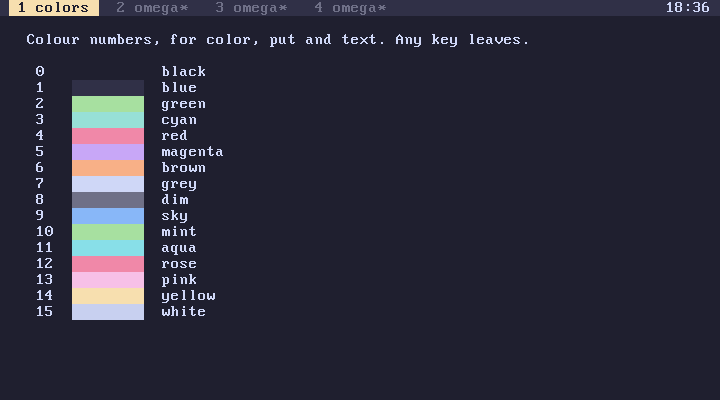
Characters that weren't there
The VGA font lives in plane 2 of video memory, and the kernel rewrites part of it at boot. Characters 0x80 to 0x8B are replaced with:
| Code | Character |
|---|---|
0x80 |
omega |
0x81 |
aleph |
0x82 to 0x8B |
subscript 0 to 9 |
The ordinals print with them as real ω and the cardinals as real ℵ₀. In a string, \w is 0x80 and \A is 0x81. The subscript digits have no escape, so use 130 chr and up. The original characters at those codes are gone.
The tab bar
Row 0 is drawn by the kernel, not by any tab, so you can't draw over it with put. It shows the four tab titles, highlights the current one, marks the ones with something new with *, and shows the clock at the right edge. The clock is the machine's real-time clock, which in QEMU is UTC by default.
Poking it
You can also write straight into 0xB8000 with poke. It works, and it's overwritten the next time the visible tab is drawn. See memory for the details.
Why 80 by 25
That is the size of VGA text mode. Every program in root is drawn for it, and a bigger screen would need a graphics driver.
